Downloads its data from the UCSD Book Graph. Choose a GPU runtime in Colab (Runtime → Change runtime type).
Yue Li, Ph.D. Assistant Professor Department of Communication Studies
Adapted from the AI for Humanists tutorial “Training and Fine-Tuning BERT for Classification” by Maria Antoniak, Melanie Walsh, and David Mimno (original tutorial).
This notebook will demonstrate how users can train and fine-tune a BERT model for classification with the popular HuggingFace transformers Python library.
We will fine-tune a BERT model on Goodreads reviews from the UCSD Book Graph with the goal of predicting the genre of the book being reviewed. The genres include:
poetry
comics & graphic
fantasy & paranormal
history & biography
mystery, thriller, & crime
romance
young adult
Basic steps involved in using BERT and HuggingFace:
Divide your data into training and test sets.
Encode your data into a format BERT will understand.
Combine your data and labels into dataset objects.
Load the pre-trained BERT model.
Fine-tune the model using your training data.
Predict new labels and evaluate performance on your test data.
Import necessary Python libraries and modules
To use the HuggingFace transformers Python library, we will install it with pip. Remember that when you run a command in a Jupyter notebook that starts with !, that command will run on the command line (not in Python). Because we’re working in Colab, you’ll need to reinstall any new packages everytime you restart the kernel.
Requirement already satisfied: transformers in /usr/local/lib/python3.12/dist-packages (5.2.0)
Requirement already satisfied: huggingface-hub<2.0,>=1.3.0 in /usr/local/lib/python3.12/dist-packages (from transformers) (1.4.1)
Requirement already satisfied: numpy>=1.17 in /usr/local/lib/python3.12/dist-packages (from transformers) (2.0.2)
Requirement already satisfied: packaging>=20.0 in /usr/local/lib/python3.12/dist-packages (from transformers) (26.0)
Requirement already satisfied: pyyaml>=5.1 in /usr/local/lib/python3.12/dist-packages (from transformers) (6.0.3)
Requirement already satisfied: regex!=2019.12.17 in /usr/local/lib/python3.12/dist-packages (from transformers) (2025.11.3)
Requirement already satisfied: tokenizers<=0.23.0,>=0.22.0 in /usr/local/lib/python3.12/dist-packages (from transformers) (0.22.2)
Requirement already satisfied: typer-slim in /usr/local/lib/python3.12/dist-packages (from transformers) (0.23.1)
Requirement already satisfied: safetensors>=0.4.3 in /usr/local/lib/python3.12/dist-packages (from transformers) (0.7.0)
Requirement already satisfied: tqdm>=4.27 in /usr/local/lib/python3.12/dist-packages (from transformers) (4.67.3)
Requirement already satisfied: filelock in /usr/local/lib/python3.12/dist-packages (from huggingface-hub<2.0,>=1.3.0->transformers) (3.21.2)
Requirement already satisfied: fsspec>=2023.5.0 in /usr/local/lib/python3.12/dist-packages (from huggingface-hub<2.0,>=1.3.0->transformers) (2025.3.0)
Requirement already satisfied: hf-xet<2.0.0,>=1.2.0 in /usr/local/lib/python3.12/dist-packages (from huggingface-hub<2.0,>=1.3.0->transformers) (1.2.0)
Requirement already satisfied: httpx<1,>=0.23.0 in /usr/local/lib/python3.12/dist-packages (from huggingface-hub<2.0,>=1.3.0->transformers) (0.28.1)
Requirement already satisfied: shellingham in /usr/local/lib/python3.12/dist-packages (from huggingface-hub<2.0,>=1.3.0->transformers) (1.5.4)
Requirement already satisfied: typing-extensions>=4.1.0 in /usr/local/lib/python3.12/dist-packages (from huggingface-hub<2.0,>=1.3.0->transformers) (4.15.0)
Requirement already satisfied: typer>=0.23.1 in /usr/local/lib/python3.12/dist-packages (from typer-slim->transformers) (0.23.1)
Requirement already satisfied: anyio in /usr/local/lib/python3.12/dist-packages (from httpx<1,>=0.23.0->huggingface-hub<2.0,>=1.3.0->transformers) (4.12.1)
Requirement already satisfied: certifi in /usr/local/lib/python3.12/dist-packages (from httpx<1,>=0.23.0->huggingface-hub<2.0,>=1.3.0->transformers) (2026.1.4)
Requirement already satisfied: httpcore==1.* in /usr/local/lib/python3.12/dist-packages (from httpx<1,>=0.23.0->huggingface-hub<2.0,>=1.3.0->transformers) (1.0.9)
Requirement already satisfied: idna in /usr/local/lib/python3.12/dist-packages (from httpx<1,>=0.23.0->huggingface-hub<2.0,>=1.3.0->transformers) (3.11)
Requirement already satisfied: h11>=0.16 in /usr/local/lib/python3.12/dist-packages (from httpcore==1.*->httpx<1,>=0.23.0->huggingface-hub<2.0,>=1.3.0->transformers) (0.16.0)
Requirement already satisfied: click>=8.0.0 in /usr/local/lib/python3.12/dist-packages (from typer>=0.23.1->typer-slim->transformers) (8.3.1)
Requirement already satisfied: rich>=10.11.0 in /usr/local/lib/python3.12/dist-packages (from typer>=0.23.1->typer-slim->transformers) (13.9.4)
Requirement already satisfied: annotated-doc>=0.0.2 in /usr/local/lib/python3.12/dist-packages (from typer>=0.23.1->typer-slim->transformers) (0.0.4)
Requirement already satisfied: markdown-it-py>=2.2.0 in /usr/local/lib/python3.12/dist-packages (from rich>=10.11.0->typer>=0.23.1->typer-slim->transformers) (4.0.0)
Requirement already satisfied: pygments<3.0.0,>=2.13.0 in /usr/local/lib/python3.12/dist-packages (from rich>=10.11.0->typer>=0.23.1->typer-slim->transformers) (2.19.2)
Requirement already satisfied: mdurl~=0.1 in /usr/local/lib/python3.12/dist-packages (from markdown-it-py>=2.2.0->rich>=10.11.0->typer>=0.23.1->typer-slim->transformers) (0.1.2)
Requirement already satisfied: transformers in /usr/local/lib/python3.12/dist-packages (5.2.0)
Requirement already satisfied: accelerate in /usr/local/lib/python3.12/dist-packages (1.12.0)
Requirement already satisfied: huggingface-hub<2.0,>=1.3.0 in /usr/local/lib/python3.12/dist-packages (from transformers) (1.4.1)
Requirement already satisfied: numpy>=1.17 in /usr/local/lib/python3.12/dist-packages (from transformers) (2.0.2)
Requirement already satisfied: packaging>=20.0 in /usr/local/lib/python3.12/dist-packages (from transformers) (26.0)
Requirement already satisfied: pyyaml>=5.1 in /usr/local/lib/python3.12/dist-packages (from transformers) (6.0.3)
Requirement already satisfied: regex!=2019.12.17 in /usr/local/lib/python3.12/dist-packages (from transformers) (2025.11.3)
Requirement already satisfied: tokenizers<=0.23.0,>=0.22.0 in /usr/local/lib/python3.12/dist-packages (from transformers) (0.22.2)
Requirement already satisfied: typer-slim in /usr/local/lib/python3.12/dist-packages (from transformers) (0.23.1)
Requirement already satisfied: safetensors>=0.4.3 in /usr/local/lib/python3.12/dist-packages (from transformers) (0.7.0)
Requirement already satisfied: tqdm>=4.27 in /usr/local/lib/python3.12/dist-packages (from transformers) (4.67.3)
Requirement already satisfied: psutil in /usr/local/lib/python3.12/dist-packages (from accelerate) (5.9.5)
Requirement already satisfied: torch>=2.0.0 in /usr/local/lib/python3.12/dist-packages (from accelerate) (2.9.0+cu128)
Requirement already satisfied: filelock in /usr/local/lib/python3.12/dist-packages (from huggingface-hub<2.0,>=1.3.0->transformers) (3.21.2)
Requirement already satisfied: fsspec>=2023.5.0 in /usr/local/lib/python3.12/dist-packages (from huggingface-hub<2.0,>=1.3.0->transformers) (2025.3.0)
Requirement already satisfied: hf-xet<2.0.0,>=1.2.0 in /usr/local/lib/python3.12/dist-packages (from huggingface-hub<2.0,>=1.3.0->transformers) (1.2.0)
Requirement already satisfied: httpx<1,>=0.23.0 in /usr/local/lib/python3.12/dist-packages (from huggingface-hub<2.0,>=1.3.0->transformers) (0.28.1)
Requirement already satisfied: shellingham in /usr/local/lib/python3.12/dist-packages (from huggingface-hub<2.0,>=1.3.0->transformers) (1.5.4)
Requirement already satisfied: typing-extensions>=4.1.0 in /usr/local/lib/python3.12/dist-packages (from huggingface-hub<2.0,>=1.3.0->transformers) (4.15.0)
Requirement already satisfied: setuptools in /usr/local/lib/python3.12/dist-packages (from torch>=2.0.0->accelerate) (75.2.0)
Requirement already satisfied: sympy>=1.13.3 in /usr/local/lib/python3.12/dist-packages (from torch>=2.0.0->accelerate) (1.14.0)
Requirement already satisfied: networkx>=2.5.1 in /usr/local/lib/python3.12/dist-packages (from torch>=2.0.0->accelerate) (3.6.1)
Requirement already satisfied: jinja2 in /usr/local/lib/python3.12/dist-packages (from torch>=2.0.0->accelerate) (3.1.6)
Requirement already satisfied: nvidia-cuda-nvrtc-cu12==12.8.93 in /usr/local/lib/python3.12/dist-packages (from torch>=2.0.0->accelerate) (12.8.93)
Requirement already satisfied: nvidia-cuda-runtime-cu12==12.8.90 in /usr/local/lib/python3.12/dist-packages (from torch>=2.0.0->accelerate) (12.8.90)
Requirement already satisfied: nvidia-cuda-cupti-cu12==12.8.90 in /usr/local/lib/python3.12/dist-packages (from torch>=2.0.0->accelerate) (12.8.90)
Requirement already satisfied: nvidia-cudnn-cu12==9.10.2.21 in /usr/local/lib/python3.12/dist-packages (from torch>=2.0.0->accelerate) (9.10.2.21)
Requirement already satisfied: nvidia-cublas-cu12==12.8.4.1 in /usr/local/lib/python3.12/dist-packages (from torch>=2.0.0->accelerate) (12.8.4.1)
Requirement already satisfied: nvidia-cufft-cu12==11.3.3.83 in /usr/local/lib/python3.12/dist-packages (from torch>=2.0.0->accelerate) (11.3.3.83)
Requirement already satisfied: nvidia-curand-cu12==10.3.9.90 in /usr/local/lib/python3.12/dist-packages (from torch>=2.0.0->accelerate) (10.3.9.90)
Requirement already satisfied: nvidia-cusolver-cu12==11.7.3.90 in /usr/local/lib/python3.12/dist-packages (from torch>=2.0.0->accelerate) (11.7.3.90)
Requirement already satisfied: nvidia-cusparse-cu12==12.5.8.93 in /usr/local/lib/python3.12/dist-packages (from torch>=2.0.0->accelerate) (12.5.8.93)
Requirement already satisfied: nvidia-cusparselt-cu12==0.7.1 in /usr/local/lib/python3.12/dist-packages (from torch>=2.0.0->accelerate) (0.7.1)
Requirement already satisfied: nvidia-nccl-cu12==2.27.5 in /usr/local/lib/python3.12/dist-packages (from torch>=2.0.0->accelerate) (2.27.5)
Requirement already satisfied: nvidia-nvshmem-cu12==3.3.20 in /usr/local/lib/python3.12/dist-packages (from torch>=2.0.0->accelerate) (3.3.20)
Requirement already satisfied: nvidia-nvtx-cu12==12.8.90 in /usr/local/lib/python3.12/dist-packages (from torch>=2.0.0->accelerate) (12.8.90)
Requirement already satisfied: nvidia-nvjitlink-cu12==12.8.93 in /usr/local/lib/python3.12/dist-packages (from torch>=2.0.0->accelerate) (12.8.93)
Requirement already satisfied: nvidia-cufile-cu12==1.13.1.3 in /usr/local/lib/python3.12/dist-packages (from torch>=2.0.0->accelerate) (1.13.1.3)
Requirement already satisfied: triton==3.5.0 in /usr/local/lib/python3.12/dist-packages (from torch>=2.0.0->accelerate) (3.5.0)
Requirement already satisfied: typer>=0.23.1 in /usr/local/lib/python3.12/dist-packages (from typer-slim->transformers) (0.23.1)
Requirement already satisfied: anyio in /usr/local/lib/python3.12/dist-packages (from httpx<1,>=0.23.0->huggingface-hub<2.0,>=1.3.0->transformers) (4.12.1)
Requirement already satisfied: certifi in /usr/local/lib/python3.12/dist-packages (from httpx<1,>=0.23.0->huggingface-hub<2.0,>=1.3.0->transformers) (2026.1.4)
Requirement already satisfied: httpcore==1.* in /usr/local/lib/python3.12/dist-packages (from httpx<1,>=0.23.0->huggingface-hub<2.0,>=1.3.0->transformers) (1.0.9)
Requirement already satisfied: idna in /usr/local/lib/python3.12/dist-packages (from httpx<1,>=0.23.0->huggingface-hub<2.0,>=1.3.0->transformers) (3.11)
Requirement already satisfied: h11>=0.16 in /usr/local/lib/python3.12/dist-packages (from httpcore==1.*->httpx<1,>=0.23.0->huggingface-hub<2.0,>=1.3.0->transformers) (0.16.0)
Requirement already satisfied: mpmath<1.4,>=1.1.0 in /usr/local/lib/python3.12/dist-packages (from sympy>=1.13.3->torch>=2.0.0->accelerate) (1.3.0)
Requirement already satisfied: click>=8.0.0 in /usr/local/lib/python3.12/dist-packages (from typer>=0.23.1->typer-slim->transformers) (8.3.1)
Requirement already satisfied: rich>=10.11.0 in /usr/local/lib/python3.12/dist-packages (from typer>=0.23.1->typer-slim->transformers) (13.9.4)
Requirement already satisfied: annotated-doc>=0.0.2 in /usr/local/lib/python3.12/dist-packages (from typer>=0.23.1->typer-slim->transformers) (0.0.4)
Requirement already satisfied: MarkupSafe>=2.0 in /usr/local/lib/python3.12/dist-packages (from jinja2->torch>=2.0.0->accelerate) (3.0.3)
Requirement already satisfied: markdown-it-py>=2.2.0 in /usr/local/lib/python3.12/dist-packages (from rich>=10.11.0->typer>=0.23.1->typer-slim->transformers) (4.0.0)
Requirement already satisfied: pygments<3.0.0,>=2.13.0 in /usr/local/lib/python3.12/dist-packages (from rich>=10.11.0->typer>=0.23.1->typer-slim->transformers) (2.19.2)
Requirement already satisfied: mdurl~=0.1 in /usr/local/lib/python3.12/dist-packages (from markdown-it-py>=2.2.0->rich>=10.11.0->typer>=0.23.1->typer-slim->transformers) (0.1.2)
Next, we will import necessary Python libraries and modules. These include as gdown, for downloading large files from Google Drive (where we will get our UCSD Goodreads reviews), as well as scikit-learn (sklearn) and PyTorch (torch), for various machine learning tools.
from collections import defaultdictimport gdownimport gzipimport jsonimport randomimport pickleimport pandas as pdimport numpy as npfrom sklearn.metrics import accuracy_score, precision_recall_fscore_support, classification_reportfrom sklearn.feature_extraction.text import TfidfVectorizerfrom sklearn.linear_model import LogisticRegressionimport torchfrom transformers import DistilBertTokenizerFast, DistilBertForSequenceClassificationfrom transformers import Trainer, TrainingArguments%matplotlib inlineimport matplotlib.pyplot as pltimport seaborn as snsfrom matplotlib import tickersns.set(style='ticks', font_scale=1.2)
Set parameters and file paths
# This is the name of the BERT model that we want to use.# We're using DistilBERT to save space (it's a distilled version of the full BERT model),# and we're going to use the cased (vs uncased) version.model_name ='distilbert-base-cased'# This is the name of the program management system for NVIDIA GPUs. We're going to send our code here.device_name ='cuda'# This is the maximum number of tokens in any document sent to BERT.max_length =512# This is the name of the directory where we'll save our model. You can name it whatever you want.cached_model_directory_name ='distilbert-reviews-genres'
Load and sample Goodreads data
In this cell, we create a Python dictionary with each genre and the link to the corresponding UCSD Goodreads review data for that genre on Google Drive.
If you manually click on any of the URLs, you will be able to download the data for that genre. For example, here’s the link for poetry: https://drive.google.com/uc?id=1FVD3LxJXRc5GrKm97LehLgVGbRfF9TyO
# This is where our target data is hosted on the web. You only need these paths for the book review dataset.genre_url_dict = {'poetry': 'https://drive.google.com/uc?id=1mWDEbd5i4kXqYHHWcxBQ0qQx-dKfFWik','children': 'https://drive.google.com/uc?id=18aCsiGeNq9kxfDHyr1A-oODoeIAtpvV6','comics_graphic': 'https://drive.google.com/uc?id=1kHhmcO3Hz2cIhxIFK6aRvTZ1TdrvLTZS','fantasy_paranormal': 'https://drive.google.com/uc?id=1S749kMNmQZmOq9XEKg7Xc1YL_vEH0lfA','history_biography': 'https://drive.google.com/uc?id=1WmsB0nKX2bKgzJJJ2XSea_3QfV5umeqW','mystery_thriller_crime': 'https://drive.google.com/uc?id=1VXeXevB2PW6p9esgQTdwMeoHcUMIhyUY','romance': 'https://drive.google.com/uc?id=18TlvpA377c2Dzhh9pzW1eaMoSpfTNqDt','young_adult': 'https://drive.google.com/uc?id=1-oNsvebACiPWwxsE-W0Y4ehYBjyLvieO'}
Next we loop through this dictionary and use gdown to download the Goodreads review data for each genre from Google Drive. This can take a few moments to run.
for _genre, _url in genre_url_dict.items(): gdown.download(_url, _genre +'.json.gz', quiet=False)
Downloading...
From (original): https://drive.google.com/uc?id=1mWDEbd5i4kXqYHHWcxBQ0qQx-dKfFWik
From (redirected): https://drive.google.com/uc?id=1mWDEbd5i4kXqYHHWcxBQ0qQx-dKfFWik&confirm=t&uuid=cd9ce130-b7a0-4c4a-9085-bc2bb27c76d3
To: /content/poetry.json.gz
100%|██████████| 49.4M/49.4M [00:02<00:00, 24.1MB/s]
Downloading...
From (original): https://drive.google.com/uc?id=18aCsiGeNq9kxfDHyr1A-oODoeIAtpvV6
From (redirected): https://drive.google.com/uc?id=18aCsiGeNq9kxfDHyr1A-oODoeIAtpvV6&confirm=t&uuid=bb801471-f659-4d0c-8198-511b2900cee9
To: /content/children.json.gz
100%|██████████| 172M/172M [00:03<00:00, 43.0MB/s]
Downloading...
From (original): https://drive.google.com/uc?id=1kHhmcO3Hz2cIhxIFK6aRvTZ1TdrvLTZS
From (redirected): https://drive.google.com/uc?id=1kHhmcO3Hz2cIhxIFK6aRvTZ1TdrvLTZS&confirm=t&uuid=8392abe4-e146-4f65-beb3-12c162001a6f
To: /content/comics_graphic.json.gz
100%|██████████| 147M/147M [00:02<00:00, 54.0MB/s]
Downloading...
From (original): https://drive.google.com/uc?id=1S749kMNmQZmOq9XEKg7Xc1YL_vEH0lfA
From (redirected): https://drive.google.com/uc?id=1S749kMNmQZmOq9XEKg7Xc1YL_vEH0lfA&confirm=t&uuid=6cd76b04-42df-42aa-a083-d949199cd442
To: /content/fantasy_paranormal.json.gz
100%|██████████| 1.26G/1.26G [00:12<00:00, 102MB/s]
Downloading...
From (original): https://drive.google.com/uc?id=1WmsB0nKX2bKgzJJJ2XSea_3QfV5umeqW
From (redirected): https://drive.google.com/uc?id=1WmsB0nKX2bKgzJJJ2XSea_3QfV5umeqW&confirm=t&uuid=48adcb2e-17c0-421e-8625-559bdc46831f
To: /content/history_biography.json.gz
100%|██████████| 754M/754M [00:12<00:00, 59.0MB/s]
Downloading...
From (original): https://drive.google.com/uc?id=1VXeXevB2PW6p9esgQTdwMeoHcUMIhyUY
From (redirected): https://drive.google.com/uc?id=1VXeXevB2PW6p9esgQTdwMeoHcUMIhyUY&confirm=t&uuid=b36f4beb-44c2-4caa-a9e9-aa75ccb998ad
To: /content/mystery_thriller_crime.json.gz
100%|██████████| 610M/610M [00:09<00:00, 65.9MB/s]
Downloading...
From (original): https://drive.google.com/uc?id=18TlvpA377c2Dzhh9pzW1eaMoSpfTNqDt
From (redirected): https://drive.google.com/uc?id=18TlvpA377c2Dzhh9pzW1eaMoSpfTNqDt&confirm=t&uuid=d3098cda-d50e-4520-b9a8-1d29ab7058b1
To: /content/romance.json.gz
100%|██████████| 1.30G/1.30G [00:27<00:00, 47.8MB/s]
Downloading...
From (original): https://drive.google.com/uc?id=1-oNsvebACiPWwxsE-W0Y4ehYBjyLvieO
From (redirected): https://drive.google.com/uc?id=1-oNsvebACiPWwxsE-W0Y4ehYBjyLvieO&confirm=t&uuid=62c84766-14ad-4611-89cf-849f8f364b28
To: /content/young_adult.json.gz
100%|██████████| 899M/899M [00:17<00:00, 52.1MB/s]
If you click the file browser icon in the left-hand side bar, you should see that these files have now been download.
Next we create a function load_reviews(), which will use gzip to unzip the downloaded Goodreads review JSON files and json to load the JSON files once they’re unzipped.
def load_reviews(file_name, head=None): reviews = [] count =0with gzip.open(file_name) asfile:for line infile: d = json.loads(line) count +=1 _book_id = d['book_id'] reviews.append(d['review_text'])# Break if we reach the Nth lineif (head isnotNone) and (count > head):breakreturn reviews
Now we apply the load_reviews() function. For each genre, we load and unzip the corresponding .json.gz file, e.g., poetry.json.gz, then we randomly sample 2000 Goodreads reviews and make a dictionary genre_reviews_dict of all these reviews.
Let’s preview a couple of the key-value pairs in genre_reviews_dict
for _genre, _reviews in genre_reviews_dict.items():print('===========================')print(_genre)print('===========================')print(random.sample(_reviews, 1)[0])print()
===========================
poetry
===========================
So genius! One of those - why didn't I think of this - kinds of things...

===========================
children
===========================
A
 SM

===========================
comics_graphic
===========================
Super sweet! I love Ito and Mako's developing relationship!

===========================
fantasy_paranormal
===========================


===========================
history_biography
===========================
Interesting theory, and I really like Graham Hancock's writing style.

===========================
mystery_thriller_crime
===========================
A short story that starts a new series by Janet Evanovich. Like Stephanie Plum, the FBI agent Kate O'Hare likes junk food and is chasing after a hot man. The twist is that this hot man is criminal. I'll catch the rest of the series on audiobook, because it is fluffy and hopefully entertain me.

===========================
romance
===========================
Hiaaahh...
 *Spektakuler*
 Waktu suami pulang ke Indo, saya minta oleh2 buku Tere Liye..iyah...bagi saya bukunya sudah seperti kacang Bali, teh Tong Tji atau emping manis Ny Shiok..makanan yg saya rindukan di rantau dan tidak bisa didapat cuma di Indonesia.
 Buku ini begitu saya baca, langsung..hmm..ini kan Christmas Carol-nya Charles Dickens? Kok gak orisinil? Percis kejadiannya di malam takbiran sementara Christmas Carol di Christmas Eve. Percis org kaya yg mau mati dibawa melihat kehidupan yg lama oleh malaikan dan bertobat.
 Tapi setelah saya baca lagi..oh..ini dikawinkan dengan White Tiger-nya Aranvind Adiga, ada kemarahan yang mentah, ada rise to glory, plus percis banget sama tokoh utama White Tiger yg suka memandang bulan. Raw Anger ini dikawinkan dengan flashback plot Christmas Carol..jadi ya boleh dihitung orisinil lah..seperti fusion food.
 Yang saya suka dari karya ini adalah
 1) kekayaan deskripsi
 ada bagian2 yg bisa membuat saya merasa seperti sedang nonton film di depan mata.
 Adegan Rinai menangis di hal 5:
 Rinai hanya tahu ia mau menangis. Hatinya sedih. Teramat sedih malah. Maka matanya pelan membasah. Memeluk boneka beruang madunya lebih erat. Angin semilir yang lembut justru menikam perasaan. Sendiri. Sepi. Setelah sekian lama menanti jawaban, Rinai perlahan menunduk (snip). Satu bulir air akhirnya merekah, menggelayut di pelupuk mata Rinai. Pelan kristal air itu bergulir menggelinding. Membentuk parit di pipi. Membentuk gurat kemilau di lesung. Tetes air itu terdiam sejenak di dagu. Menumpuk. Membesar. Kemudian dalam gerakan lambat yang pilu, terlepaskan. P-e-r-l-a-h-a-n.
 Ya ampppuuuuunnnn....ada berapa penulis di dunia yang bisa menggambarkan air mata jatuh begitu panjangnya, begitu indahnya? Kita semua pernah lihat bagaimana air mata jatuh dan bagaimana momen itu indah dan begitu singkat. Tapi Tere Liye sanggup memperpanjang momen keindahan, yg mestinya hanya terjadi 1-2 detik itu jadi 1 halaman!!(termasuk yg saya snip). Saya rasa dia sudah memenuhi kewajibannya sebagai penulis, mengajak pembaca menghargai dan mengabadikan momen2 singkat dalam hidup yg biasanya terlewat begitu saja. To halt and appreciate. Seolah adegan air mata jatuh itu difoto dan dibingkai kemudian dipajang di ruang tamu oleh Tere Liye.
 Adegan wkt si malaikat ikut naik kereta di atas.Hal 145:
 Wuss...kereta melaju kencang. Memedihkan mata. Pasien berumur enam puluh tahun itu untuk kesekian kalinya gelagapan. Lagi-lagi hampir jatuh dari ketinggian. Tangannya sibuk mencari pegangan. Orang dengan wajah menyenangkan yg duduk di sebelahnya membantu. Memberikan Lengan. "Bukan main. Cepat. Dan ternyata mengasyikkan! Astaga, ini hebat, Ray!" Orang dengan wajah menyenangkan tertawa lebar. Jubahnya berkibar. Matanya memicing. Mukanya kebas oleh terpaan angin. (snip)
 "APA YANG KAU TANYAKAN, TADI?" Orang dengan wajah menyenangkan menoleh. Sedikit berteriak. Suara gemeletuk kereta memekakkan. Muka orang itu terlihat riang sekali. Benar-benar bak turis sedang plesir, menikmati sore indah di atas gerbong kereta.
 Saya suka cara Tere Liye berlama-lama menjelaskan satu scene tanpa merasa perlu tergesa-gesa2 masuk ke scene berikutnya. Waktu, bagi saya penting utk memberikan kesempatan pembaca engage dengan bacaannya. Butuh 1 1/2 halaman sampai akhirnya mereka masuk ke percakapan.
 2) Kekayaan kosa kata dan pemakaian huruf besar.
 desing kumbang, derik jangkrik, larik hujan, kuping yg tabal, muka yg kebas, uhu burung hantu. Entah apa krn saya kelamaan merantau sehingga kosa kata ini baru di kuping? Yang jelas saya jadi belajar banyak kosa kata baru. Pemakaian huruf besar seperti di nomor satu dalam percakapan, membuat saya merasa volume percakapakan tiba2 besar. So real.
 3) Semakin saya baca, ini sepertinya jatuhnya novel religi Islam, ada pesan2 yang menggurui. Tapi saya tidak merasa antipati sama sekali untuk menikmatinya. Novel ini menggurui tanpa terkesan seperti guru. Karena Islam-nya Tere Liye itu seperti Islam-nya Khaled Hosseini (The Kite Runner and A Thousand Splendid Sun) : damai, arif, b-e-a-u-t-i-f-u-l.
 Ajaran-ajarannya universal dan melampaui batas-batas agama. Sebenarnya mungkin hal-hal yg sudah kita tahu, namun mesti diulang-ulang terus karena gampang lupa. Tentang bagaimana kita ingat melihat ke bawah kalau sedang di atas, tentang bagaimana kita bisa memperoleh kedamaian hati kalau kita bisa merasa cukup. Hal-hal biasa kok, tapi hal-hal yang susah dilaksanakan.
 4)Penamaan tokoh untuk memperkuat karakter
 Saya suka cara pembedaan panggilan tokoh utama, di mana dia sebenarnya Ray tapi oleh Jo, bawahannya, dia dipanggil Mas Rae. Hanya dengan satu hal ini karakter Jo jadi diperkuat. Ia tidak lebih dari seorang buruh rendahan yang walaupun sampai ikut naik pangkat dengan Ray, tetap saja ke-kampungan-nya tidak bisa hilang.
 Kebanyakan karakter di novel ini punya nama yang langsung dipakai. Tapi untuk memperkuat hubungan suami istri, justru Ray dan istrinya selalu saling memanggil dengan 'ceroboh' dan 'gigi kelinci'. Ini meng-highlight hubungan dan posisi khusus mereka dalam novel. Juga sang 'malaikat' yang gak bernama, dan selalu menolak menjawab dia siapa. Again, dia punya posisi khusus sehingga dapat perlakuan khusus.
 Saya juga suka nama2 yang biasa dan membumi spt Oude dan Ouda, Plee, Ape, bercampur dengan nama2 indah dan luhur spt Rinai, Fitri, Natan dan Ilham. Ini menggambarkan kemajemukan karakter hanya dengan satu kata.
 Ada sih, sebenarnya, beberapa hal yg mengganggu saya, seperti:
 -Nih org kok hidupnya sial banget yah..kayaknya gak ada deh org sesial itu
 -Semua org2 dalam hidupnya kok berhubungan ya..dalam kenyataan gak mungkin gitu deh
 -Pemakaian hyphen, A-p-a-k-a-h-a-k-u-a-k-a-n-m-a-t-i...haduh...bacanya bingung..ini mesti gimana ya..? Ngetiknya aja gak enak. Kalau masih pendek gak papa, kalau udah panjang pusing.
 -dalam kenyataan, mana bisa org gak ada ijazah naik setinggi itu dalam karir. Di perusahaan manapun ada requirement ijazah utk posisi tertentu
 Tapi yah..hal2 mengganggu itu tertutup oleh teknik tulisan dan inspiring things dalam novel ini.
 Rasanya, kalau saya ketemu langsung Tere Liye, pengen deh saya tersungkur di depannya dan berteriak, "SUHU!! JADIKAN SAYA MURIDMU!!!"
 Subuh ketika saya menghabiskan novel ini, entah kenapa saya terbangun agak terlalu pagi. Saya baca halaman-halaman terakhirnya sebelum bangkit untuk bersiap ngantor. Ketika saya akhirnya menamatkannya, masih dalam gelap, saya tengok ke sebelah, selimut yang membungkus suami sampai ke leher naik turun dengan teratur. Di kamarnya, mata anak saya berkedip-kedip dengan muka bantalnya ketika saya cium dalam tidur.
 Aahh...life is beautiful. Buku ini memampukan saya untuk merasakannya.
 (dan inilah alasan kenapa saya berikan bintang ke-5)

===========================
young_adult
===========================
Vault of Dreams by Luke Taylor is is an outstanding YA novel. I read a lot of YA books and this one has beat them all. Luke Taylor has created a fictional world where the rightful ruler is fighting to gain her throne back. War breaks out, loyalty is shown, and a budding romance begins. This fantasy novel has everything. Action, adventure, friendships, and a fight worth reading. Absolutely, an epic tale.
 The Vault of Dreams reads as vividly as the Lord of Rings books. I was hooked. The rightful queen, Arelyn, is a character to hold. Watching her, throughout the pages was fun. Niles is another interesting character. Him and Finleigh are great. Finleigh is a young gsypie. Niles turns into a Lord at such a young age. Morgance is a bold and strong character. Evil too. Arelyn and Finleigh become friends. Two good charcaters. I liked them both. Strong female protagonists. Each character both bad and good added to the plot. The exciting part was that each got to tell the story from their point of view. That was a susrpise. Most writers who try this, end up losing readers due to the point of view taking away or not adding enough to the story. I found the changing point of views to being good. It was like stepping into each character's soul. Understanding them better. I easily see this book as a crossover read. Both yong adults and adult alike will get lost in within this world. Luke Taylor has outdone himself in this spectacular piece. I look forward to reading more by him in the future.
Here we use pickle to save this Python dictionary to a .pickle file so we can easily load it later.
The pickle module allows you to save and load Python objects like lists and dictionaries.
When training a machine learning model, it is necessary to split your training data into two parts: a training set and a test set.
We will train our BERT model on the “training” set of Goodreads reviews and then we will evaluate how well it is performing by running it on the “test” set of Goodreads reviews that the model has never seen before.
Normally, to tune the hyperparameters, you should also create a “validation” set for tuning, and only use the “test” set once, at the end of all tuning. For simplicity, in this tutorial, we will only using a training and test set.
train_texts = []train_labels = []test_texts = []test_labels = []for _genre, _reviews in genre_reviews_dict.items(): _reviews = random.sample(_reviews, 1000) # Use a very small set as an example.for _review in _reviews[:800]: train_texts.append(_review) train_labels.append(_genre)for _review in _reviews[800:]: test_texts.append(_review) test_labels.append(_genre)
Show how many Goodreads reviews and labels we have in each category: 6400 training reviews, 6400 training labels (genres), 1600 test reviews, 1600 test labels (genre)
('poetry',
 'I don\'t overly enjoy poetry for the most part, but I have to say, I really enjoy Allen Ginsberg\'s writing. \n I had previously read "Howl" and "A Supermarket in California" which I very much enjoyed. The other poems, being new to me, I thoroughly enjoyed. \n Ginsberg has a very interesting writing style that is very vivid. I love how he speaks directly to his fellow poets in some of his poems. In writing them in, he is giving them an even greater form of immortality. \n I enjoyed the poem "America." It\'s asking the citizens of America what the war is worth, but America is also asking things of him that he wouldn\'t be able to live up to. He questions his own writing in this as well. \n Ginsberg has a very musical beat to his poems that makes you have to keep reading. It pulls you along, especially when you read it out loud. \n Overall, I very much enjoyed this little book of poems.')
Run a baseline model (logistic regression)
Here we train and evaluate a simple TF-IDF baseline model using logistic regression.
We find better-than-random performance, even for a very small dataset. We’ll see whether BERT can beat this good baseline!
We train a logistic regression model from scikit-learn on the Goodreads training data, and then we use the trained model to make predictions on our Goodreads review test set.
model = LogisticRegression(max_iter=1000).fit(X_train, train_labels)predictions = model.predict(X_test)
We can use scikit-learn’s classification_report function to evaluate how well the logistic regression model’s predictions match up with the true labels for the Goodreads reviews.
Importantly, we can see that our average scores are above random performance (we have 8 classes, so random performance would be ~0.2).
We’re going to transform our texts and labels into a format that BERT (via Huggingface and PyTorch) will understand. This is called encoding the data.
Here are the steps we need to follow:
The labels—in this case, Goodreads genres—need to be turned into integers rather than strings.
The texts—in this case, Goodreads reviews—need to be truncated if they’re more than 512 tokens or padded if they’re fewer than 512 tokens. The tokens, or words in the texts, also need to be separated into “word pieces” and matched to their embedding vectors.
We need to add special tokens to help BERT:
BERT special token
Explanation
[CLS]
Start token of every document.
[SEP]
Separator between each sentence
[PAD]
Padding at the end of the document as many times as necessary, up to 512 tokens
##
Start of a “word piece”
Here we will load DistilBertTokenizerFast from the HuggingFace library, which will do all the work of encoding the texts for us. The tokenizer() will break word tokens into word pieces, truncate to 512 tokens, and add padding and special BERT tokens.
tokenizer = DistilBertTokenizerFast.from_pretrained(model_name) # The model_name needs to match our pre-trained model.
/usr/local/lib/python3.12/dist-packages/huggingface_hub/utils/_auth.py:94: UserWarning:
The secret `HF_TOKEN` does not exist in your Colab secrets.
To authenticate with the Hugging Face Hub, create a token in your settings tab (https://huggingface.co/settings/tokens), set it as secret in your Google Colab and restart your session.
You will be able to reuse this secret in all of your notebooks.
Please note that authentication is recommended but still optional to access public models or datasets.
  warnings.warn(
Warning: You are sending unauthenticated requests to the HF Hub. Please set a HF_TOKEN to enable higher rate limits and faster downloads.
WARNING:huggingface_hub.utils._http:Warning: You are sending unauthenticated requests to the HF Hub. Please set a HF_TOKEN to enable higher rate limits and faster downloads.
vocab.txt: 0%| | 0.00/213k [00:00<?, ?B/s]
tokenizer.json: 0%| | 0.00/436k [00:00<?, ?B/s]
Here we will create a map of our labels, or Goodreads genres, to integer keys. We take the unique labels, and then we make a dictionary that associates each label/tag with an integer.
Note: HuggingFace documentation sometimes refers to “labels” as “tags” but these are the same thing. We use “labels” throughout this notebook for clarity.
unique_labels =set(label for label in train_labels)label2id = {label: idforid, label inenumerate(unique_labels)}id2label = {id: label for label, idin label2id.items()}
train_encodings = tokenizer(train_texts, truncation=True, padding=True, max_length=max_length)test_encodings = tokenizer(test_texts, truncation=True, padding=True, max_length=max_length)train_labels_encoded = [label2id[y] for y in train_labels]test_labels_encoded = [label2id[y] for y in test_labels]
Examine a Goodreads review in the training set after encoding
' '.join(train_encodings[0].tokens[0:100])
'[CLS] I don \' t overly enjoy poetry for the most part , but I have to say , I really enjoy Allen G ##ins ##berg \' s writing . I had previously read " How ##l " and " A Super ##market in California " which I very much enjoyed . The other poems , being new to me , I thoroughly enjoyed . G ##ins ##berg has a very interesting writing style that is very vivid . I love how he speaks directly to his fellow poets in some of his poems . In writing them in ,'
Examine a Goodreads review in the test set after encoding
' '.join(test_encodings[0].tokens[0:100])
"[CLS] While a fan of his work and its pen ##sive and per ##verse streaks , this one didn ' t get my whole love - yes , I know kids sent in the material and he chose from that , but the bit about the turtle falling down the stairs ( hello dead turtle or suffering turtle with cracked shell ) annoyed me . I can just imagine some kid ch ##ucking his turtle down the stairs now with all the life im ##itate ##s art and kids take things much more literally than one would think . ."
Examine the training labels after encoding
set(train_labels_encoded)
{0, 1, 2, 3, 4, 5, 6, 7}
Examine the test labels after encoding
set(test_labels_encoded)
{0, 1, 2, 3, 4, 5, 6, 7}
Make a custom Torch dataset
Here we combine the encoded labels and texts into dataset objects. We use the custom Torch MyDataSet class to make a train_dataset object from the train_encodings and train_labels_encoded. We also make a test_dataset object from test_encodings, and test_labels_encoded.
class MyDataset(torch.utils.data.Dataset):def__init__(self, encodings, labels):self.encodings = encodingsself.labels = labelsdef__getitem__(self, idx): item = {key: torch.tensor(val[idx]) for key, val inself.encodings.items()} item['labels'] = torch.tensor(self.labels[idx])return itemdef__len__(self):returnlen(self.labels)
'[CLS] I don \' t overly enjoy poetry for the most part , but I have to say , I really enjoy Allen G ##ins ##berg \' s writing . I had previously read " How ##l " and " A Super ##market in California " which I very much enjoyed . The other poems , being new to me , I thoroughly enjoyed . G ##ins ##berg has a very interesting writing style that is very vivid . I love how he speaks directly to his fellow poets in some of his poems . In writing them in ,'
Examine a Goodreads review in the Torch test_dataset after encoding
' '.join(test_dataset.encodings[1].tokens[0:100])
'[CLS] " S ##yk ##sy , van ##ha a ##jo ##mie ##s , k ##use ##mass ##a vast ##en t ##u ##ult ##a j ##a m ##u ##uta ##ma on ##nell ##inen , j ##oh ##on ha ##nen par ##ske ##ens ##a o ##su ##vat la ##apa ##lla ##an le ##vi ##tte ##lem ##ass ##a ka ##sia ##an . S ##yk ##sy , se ##n il ##mee ##t , k ##un ta ##iva ##an u ##rk ##u ##ja las ##ket ##aan al ##as j ##a ve ##det las ##kos ##tu ##vat j ##ait ##a var ##ten . Hal ##us ##in'
Load pre-trained BERT model
Here we load a pre-trained DistilBERT model and send it to CUDA.
Note: If you decide to repeat fine-tuning after already running the following cells, make sure that you re-run this cell to re-load the original pre-trained model before fine-tuning again.
# The model_name needs to match the name used for the tokenizer above.model = DistilBertForSequenceClassification.from_pretrained(model_name, num_labels=len(id2label)).to(device_name)
DistilBertForSequenceClassification LOAD REPORT from: distilbert-base-cased
Key                     | Status     |
------------------------+------------+-
vocab_projector.bias    | UNEXPECTED |
vocab_layer_norm.bias   | UNEXPECTED |
vocab_transform.bias    | UNEXPECTED |
vocab_layer_norm.weight | UNEXPECTED |
vocab_transform.weight  | UNEXPECTED |
classifier.bias         | MISSING    |
classifier.weight       | MISSING    |
pre_classifier.weight   | MISSING    |
pre_classifier.bias     | MISSING    |

Notes:
- UNEXPECTED :can be ignored when loading from different task/architecture; not ok if you expect identical arch.
- MISSING    :those params were newly initialized because missing from the checkpoint. Consider training on your downstream task.
Set the BERT fine-tuning parameters
These are the arguments we’ll set in the HuggingFace TrainingArguments objects, which we’ll then pass to the HuggingFace Trainer object. There are many more possible arguments, but here we highlight the basics and some common gotchas.
When training your own model, you should search over these parameters to find the best settings for your particular dataset. You should use a held-out set of validation data for this step.
Parameter
Explanation
num_train_epochs
total number of training epochs (how many times to pass through the entire dataset; too much can cause overfitting)
per_device_train_batch_size
batch size per device during training
per_device_eval_batch_size
batch size for evaluation
warmup_steps
number of warmup steps for learning rate scheduler (set lower because of small dataset size)
weight_decay
strength of weight decay (reduces size of weights, like regularization)
output_dir
output directory for the fine-tuned model and configuration files
logging_dir
directory for storing logs
logging_steps
how often to print logging output (so that we can stop training early if the loss isn’t going down)
evaluation_strategy
evaluate while training so that we can see the accuracy going up
training_args = TrainingArguments( num_train_epochs=3, # total number of training epochs per_device_train_batch_size=16, # batch size per device during training per_device_eval_batch_size=20, # batch size for evaluation learning_rate=5e-5, # initial learning rate for Adam optimizer warmup_steps=100, # number of warmup steps for learning rate scheduler (set lower because of small dataset size) weight_decay=0.01, # strength of weight decay output_dir='./results', # output directory logging_dir='./logs', # directory for storing logs logging_steps=100, # number of steps to output logging (set lower because of small dataset size) eval_strategy='steps', # evaluate during fine-tuning so that we can see progress)
`logging_dir` is deprecated and will be removed in v5.2. Please set `TENSORBOARD_LOGGING_DIR` instead.
Fine-tune the BERT model
First, we define a custom evaluation function that returns the accuracy. You could modify this function to return precision, recall, F1, and/or other metrics.
Then we create a HuggingFace Trainer object using the TrainingArguments object that we created above. We also send our compute_metrics function to the Trainer object, along with our test and train datasets.
Note: This is what we’ve been aiming for this whole time! All the work of tokenizing, creating datasets, and setting the training arguments was for this cell.
trainer = Trainer( model=model, # the instantiated 🤗 Transformers model to be trained args=training_args, # training arguments, defined above train_dataset=train_dataset, # training dataset eval_dataset=test_dataset, # evaluation dataset (usually a validation set; here we just send our test set) compute_metrics=compute_metrics # our custom evaluation function)
Time to finally fine-tune!
Be patient; if you’ve set everything in Colab to use GPUs, then it should take around 15 minutes to run, but if you’re running on CPU, it can take hours.
After every 10 steps (as we specified in the TrainingArguments object), the trainer will output the current state of the model, including the training loss, validation (“test”) loss, and accuracy (from our compute_metrics function).
You should see the loss going down and the accuracy going up. If instead they are staying the same or oscillating, you probably need to change the fine-tuning parameters.
The following cell will save the model and its configuration files to a directory in Colab. To preserve this model for future use, you should download the model to your computer.
trainer.save_model(cached_model_directory_name)
Writing model shards: 0%| | 0/1 [00:00<?, ?it/s]
(Optional) If you’ve already fine-tuned and saved the model, you can reload it using the following line. You don’t have to run fine-tuning every time you want to evaluate.
# Run the code below to retrieve the model and the trainerfrom transformers import Trainermodel = DistilBertForSequenceClassification.from_pretrained( cached_model_directory_name)trainer = Trainer( model=model, args=training_args, eval_dataset=test_dataset,)
Loading weights: 0%| | 0/104 [00:00<?, ?it/s]
Evaluate fine-tuned model
The following function of the Trainer object will run the built-in evaluation, including our compute_metrics function.
But we might want to do more fine-grained analysis of the model, so we extract the predicted labels.
predicted_results = trainer.predict(test_dataset)
predicted_results.predictions.shape
(1600, 8)
predicted_labels = predicted_results.predictions.argmax(-1) # Get the highest probability predictionpredicted_labels = predicted_labels.flatten().tolist() # Flatten the predictions into a 1D listpredicted_labels = [id2label[l] for l in predicted_labels] # Convert from integers back to strings for readability
Pull out correct and incorrect classifications for examination
Let’s use our predicted labels for some analysis!
Now that we’ve fine-tuned and pulled out our predicted labels, the BERT part of this tutorial is done. You can now use the predicted labels in the same way you would use any set of predicted labels from any classification model. We’ll show some examples here.
First, let’s print out some example predictions that were correct.
for _true_label, _predicted_label, _text in random.sample(list(zip(test_labels, predicted_labels, test_texts)), 20):if _true_label == _predicted_label:print('LABEL:', _true_label)print('REVIEW TEXT:', _text[:100], '...')print()
LABEL: children
REVIEW TEXT: There's a name for stories about why things are the way they are, isn't there? Is "Just So Stories"  ...

LABEL: poetry
REVIEW TEXT: Sensual verse.
 The collection felt a little uneven to me - I found myself not all that into the be ...

LABEL: comics_graphic
REVIEW TEXT: My love for side couples is immense.
 It's so bad how much I love them.
 So naturally them having  ...

LABEL: comics_graphic
REVIEW TEXT: Nice, I enjoyed it, the art was cool. Not a fan of the "it's supposed to be about the women but actu ...

LABEL: children
REVIEW TEXT: So cute, I teared up a little in the end. ...

LABEL: romance
REVIEW TEXT: Reviewer: Diane
 Genre:M/M Contemporary
 5 Hearts
 Review:
 Luther Almond has inherited his gran ...

LABEL: young_adult
REVIEW TEXT: #####5 Nerdy Bad Boy Hashtags#####
 Whew... I need me an Asher Wright!!!! A tatted up bad boy looki ...

LABEL: mystery_thriller_crime
REVIEW TEXT: Jonathan Hayes brings back disgraced pathologist Edward Jenner in this brutally realistic south Flor ...

LABEL: poetry
REVIEW TEXT: nmy bHfZi llhi .. 'yaWtuh ljmyla@
 flshiW`ru ba`daki mustaHiylun ..
 wl'unuwtha@u mustaHiyla@
 sa ...

LABEL: history_biography
REVIEW TEXT: As I said earlier during the book progress, I'm not really a fan of biographies but this one was a r ...

LABEL: poetry
REVIEW TEXT: mjrd nSwS w`brt `shq wGrm wSdq@.. lktb khdhth bsr`@ dwn n tfqd mHtwh.. lm tw'thr fy lklmt.. ...

LABEL: poetry
REVIEW TEXT: I love Kerouac's poems about his travels, but don't much love his experiments with sound or his take ...

LABEL: comics_graphic
REVIEW TEXT: I fucking love Sarah Andersen's work. She's honestly one of my favorite artists. This book just rein ...
Now let’s print out some misclassifications.
for _true_label, _predicted_label, _text in random.sample(list(zip(test_labels, predicted_labels, test_texts)), 20):if _true_label != _predicted_label:print('TRUE LABEL:', _true_label)print('PREDICTED LABEL:', _predicted_label)print('REVIEW TEXT:', _text[:100], '...')print()
TRUE LABEL: poetry
PREDICTED LABEL: history_biography
REVIEW TEXT: One of my favorites. Definitely one of the best books I've read in the past five years. I'll look fo ...

TRUE LABEL: comics_graphic
PREDICTED LABEL: romance
REVIEW TEXT: Actually a 4.75 not quite a five but I did super enjoy it ...

TRUE LABEL: young_adult
PREDICTED LABEL: romance
REVIEW TEXT: Totally not what I was expecting at all but I still loved it. Such an interesting commentary on teen ...

TRUE LABEL: young_adult
PREDICTED LABEL: fantasy_paranormal
REVIEW TEXT: This is the second book in the Raven Cycle series, and I think it has a very good chance of becoming ...

TRUE LABEL: comics_graphic
PREDICTED LABEL: fantasy_paranormal
REVIEW TEXT: Really different kind of GN. Definitely the type of book you need to reread a couple of times to gra ...

TRUE LABEL: romance
PREDICTED LABEL: mystery_thriller_crime
REVIEW TEXT: Elianna is the revered Mafia Princess, Lucas is the Rufficello Bastard.
 He knows he should stay aw ...

TRUE LABEL: comics_graphic
PREDICTED LABEL: fantasy_paranormal
REVIEW TEXT: Primo numero dell'ultimo nato in casa Bonelli, Lukas.
 Horror, ubran fantasy, zombie.
 E...? E ti  ...

TRUE LABEL: young_adult
PREDICTED LABEL: fantasy_paranormal
REVIEW TEXT: ( unedited )
 MY MIND IS REELING!!! THIS BOOK IS BEYOND AMAZING! The start was a little bit slow fo ...

TRUE LABEL: children
PREDICTED LABEL: young_adult
REVIEW TEXT: Although I was about 13/14 when I read this book which is meant for a younger age group it was great ...
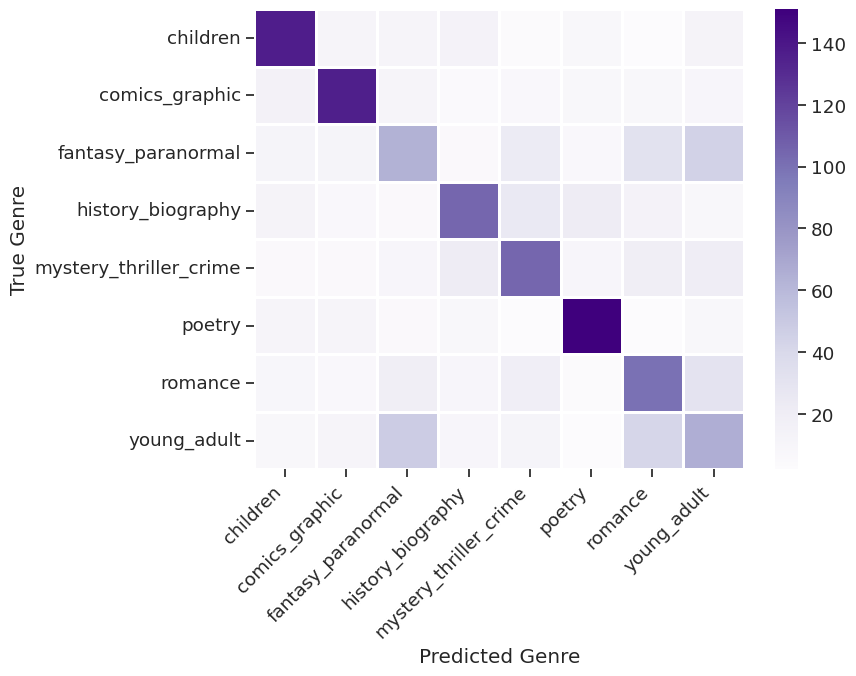
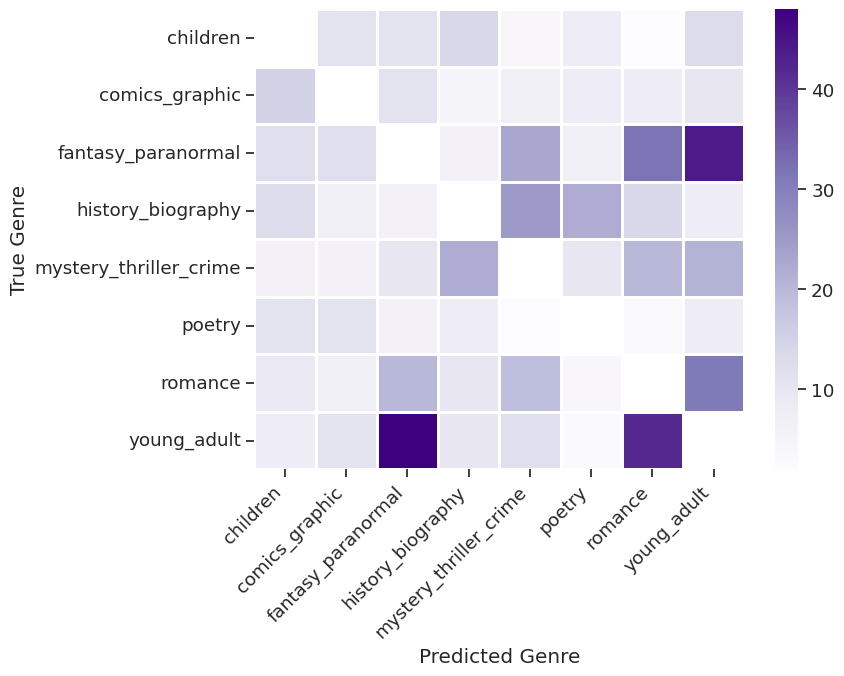
Finally, let’s create some heatmaps to examine misclassification patterns. We could use these patterns to think about similarities and differences between genres, according to book reviewers.
There’s much more you can do with your own dataset and labels! Classification can be used to apply a small set of labels across a big dataset; to explore misclassifications to better understand users; and much more! We hope you’ll use this tutorial in all kinds of creative ways.